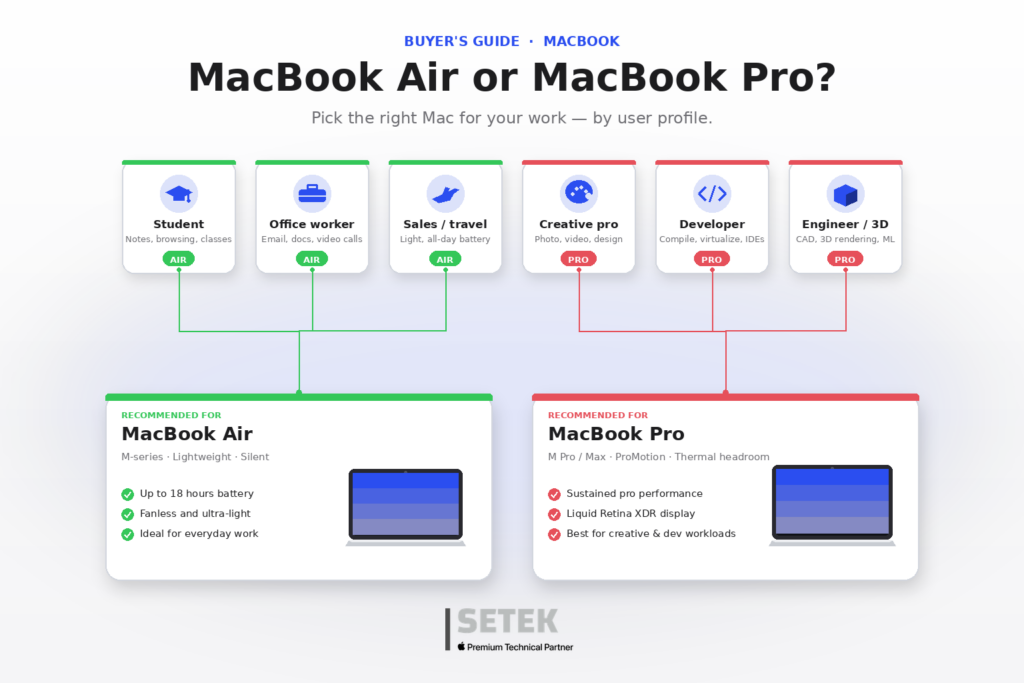
Choosing between MacBook Air and MacBook Pro is one of the most common questions IT decision-makers face when refreshing their fleet. Both deliver the unmistakable Apple experience, both run on Apple silicon, and both integrate seamlessly with Apple Business and your MDM platform. The right answer depends on what your people actually do every day.
In this guide we break down the differences between MacBook Air and MacBook Pro, the use cases each one fits best, and how SETEK — Apple Premium Technical Partner — helps businesses across Spain and the UAE pick, deploy and manage the right Mac for every role.
The quick verdict
- MacBook Air is the right choice for most knowledge workers, sales teams, executives, marketers and customer-facing professionals who need a thin, light, silent and battery-efficient device for productivity, communication and collaboration.
- MacBook Pro is the right choice for power users — engineers, developers, video and 3D editors, data scientists, photographers and architects — who run sustained heavy workloads, demand a top-tier display, need more ports and benefit from the additional GPU and memory ceilings.
If you are equipping a mixed team, the most efficient strategy is usually a two-tier standard: MacBook Air as the default and MacBook Pro for a defined set of power roles.
Performance and Apple silicon: matching the chip to the workload
Both lines run on Apple silicon, but the chip tiers differ:
- MacBook Air typically ships with the base Apple silicon chip (M-series), tuned for outstanding performance-per-watt in a fanless design.
- MacBook Pro offers the base, Pro and Max variants of Apple silicon, with significantly higher CPU and GPU core counts, more memory bandwidth and active cooling for sustained performance under heavy load.
Practical implications:
- For email, browsing, documents, video calls, light photo editing, presentations, code editing and most SaaS workloads, MacBook Air is more than enough — and its silent, fanless operation is a tangible quality-of-life benefit.
- For 4K/8K video editing, large Xcode builds, machine learning workflows, 3D rendering, complex simulation, high-end audio production and large-scale data analysis, MacBook Pro is the right tool.
Apple maintains the official, always-up-to-date specifications on the MacBook Air and MacBook Pro product pages — the only sources we recommend for the current configuration matrix.
Display, design and portability
- MacBook Air prioritizes thinness and weight. The Liquid Retina display is excellent for everyday work, presentations and video, and the device is consistently the lightest pro-grade laptop in its class.
- MacBook Pro integrates a Liquid Retina XDR display with ProMotion (high refresh rate) and superior color accuracy, designed for creative professionals and anyone who lives in color-critical workflows.
For employees who travel often across emirates or commute between offices in Madrid and Barcelona, MacBook Air’s portability is a daily advantage. For studios, post-production teams or engineering roles, MacBook Pro’s display and chassis are worth the extra grams.
Memory, storage and connectivity
- MacBook Pro supports significantly higher memory and storage configurations than MacBook Air, plus more Thunderbolt ports, an HDMI port and an SDXC card slot in the larger chassis.
- MacBook Air typically offers two Thunderbolt / USB 4 ports and MagSafe charging — a clean setup for users who dock at the desk and travel light.
If your workflows involve external GPUs, multiple high-resolution displays, fast media ingest from camera cards, or specialized I/O, MacBook Pro is the safer choice.
Battery, fans and the daily experience
- MacBook Air is fanless, completely silent and delivers all-day battery life on real workloads.
- MacBook Pro uses active cooling to sustain performance during heavy tasks; it remains quiet under typical office workloads but ramps up under heavy compute.
For executives, sales leaders and customer-facing teams, the silent operation of MacBook Air during meetings, calls and presentations is a feature that is easy to underestimate until you experience it.
Use cases by professional profile
- Executives, sales, marketing, HR, finance: MacBook Air. Light, silent, ample battery, perfect for travel and meetings.
- Developers, IT engineers, data analysts: MacBook Pro for heavy local builds and ML workloads; MacBook Air is fine for cloud-first, browser-and-IDE workflows.
- Designers, video editors, 3D artists, photographers: MacBook Pro, ideally with the Pro or Max chip and the larger display.
- Education and field teams: MacBook Air for general purpose, complemented by iPad where mobility and touch input are decisive.
- Healthcare, retail and logistics back office: MacBook Air typically wins on TCO, weight and battery.
Cost, TCO and lifecycle for businesses
The right comparison is never the sticker price — it is the total cost of ownership over a typical three-to-five-year lifecycle. Factors to weigh:
- Productivity gains from faster, silent and lighter devices.
- Energy efficiency of Apple silicon, particularly relevant in large fleets across the GCC.
- High residual value of Mac on the secondary market.
- Reduced support and ticket volume thanks to platform reliability and built-in security.
- Streamlined deployment with Zero-Touch provisioning and a well-designed MDM strategy.
When the analysis is complete, MacBook Air often wins on pure TCO for general roles, while MacBook Pro is the right investment where its performance directly converts into hours saved or revenue earned.
Apple Intelligence, security and management
Both MacBook Air and MacBook Pro support Apple Intelligence, Apple’s privacy-respecting on-device generative AI experience, and both are first-class citizens in your management stack:
- Native enrollment in Apple Business via Automated Device Enrollment.
- Centralized policy through your MDM platform (Jamf Pro, Microsoft Intune, Kandji, Mosyle).
- FileVault encryption, supervised mode, Find My, Activation Lock and Touch ID.
- Compliance support for ADHICS, the UAE PDPL, the GDPR and Spain’s Esquema Nacional de Seguridad.
Why this matters for businesses
In competitive talent markets the device experience is part of your employer brand. Standardizing on Mac signals quality, supports modern hybrid work and removes everyday friction. The decision is rarely “Air or Pro” for the whole organization — it is “the right Mac for each role, deployed and managed consistently.”
Let SETEK help you choose the right Mac at scale
At SETEK Consultants, Apple Premium Technical Partner for organizations across Spain, the UAE and the wider GCC, we help businesses define their Mac strategy: device selection by role, procurement, Apple Business configuration, MDM rollout, zero-touch deployment, AppleCare for Enterprise and ongoing managed services. Discover our real customer stories to see how we have transformed teams across the region.
Ready to choose the right MacBook for your team and roll it out without friction? Request your free consultation.